How to Set Up a Scratchpad for Your Macropad
Up until recently I’ve heard of scratchpads but, I honestly didn’t know what they were. One of the Linux channels I follow on YouTube is a big fan of using scratchpads.
After understanding what they were I thought the idea was great in concept but, I couldn’t think of any reason I would actually use a scratchpad. Until yesterday.
A project I’ve been working on over the last few months is configuring a macropad to use with my computer.
I’m not sure I’ll ever be completely done with editing this thing. I keep changing keybinds on this and layouts and LEDs, pretty much everything.
I wanted a simple way to map out what keys did what on each layer, so initially I put together a table in a document that I would have to open and look at and edit every time I wanted to see what key was mapped where at any given time. This was time consuming.
The next thought that came to me was to set up a Conky. I wasn’t sure this was the best idea either, so I thought: I will try a scratchpad!
I ran this idea by Claude to see the best way to do this, and it suggested I save the keymap as a .txt file. This was a simple diagram — a 3x4 grid with each key’s function and the action it’s bound to. There’s one of these for each of the two current layers. Claude had me put this into a special folder in my .config directory.
mkdir -p ~/.config/macrokeymap
and save keymap.txt in this directory.
The next step was to pick the viewer. In this case, Claude suggested I have it open with a bat command. This is the simple interface that I like to use whenever possible.
After that, Claude helped me write a toggle script that would launch the file if it wasn’t already running, and if it was, it would show/hide the text file in a special workspace.
I put this script in my hypr directory.
mkdir -p ~/.config/hypr/scripts
Then create the script and name it toggle-macrokeymap.sh:
#!/usr/bin/env bash
if pgrep -f "foot --app-id=macrokeymap" >/dev/null; then
    hyprctl dispatch togglespecialworkspace macrokeymap
else
    foot --app-id=macrokeymap -e bash -c \
        "bat --style=plain --paging=never ~/.config/macrokeymap/keymap.txt; echo; echo 'Press any key to close...'; read -n1"
fi
And then make it executable:
chmod +x ~/.config/hypr/scripts/toggle-macrokeymap.sh
Then I set a window rule in my windowrule config file that made the window float and set it to the correct size so everything could be seen without any scrolling.
hl.window_rule({
    name      = "macrokeymap",
    match     = { class = "^(macrokeymap)$" },
    float     = true,
    center    = true,
    size      = "750 900",
    move      = "center",
    workspace = "special:macrokeymap silent",
})
Next, I created the keybind to activate it in my binds config file. I also configured one of the keys on the macropad to activate this special workspace to show my scratchpad with the keymap config. I mapped this to Super + Shift + M.
hl.bind(mainMod .. " + SHIFT + M", hl.dsp.exec_cmd(launchPrefix .. "~/.config/hypr/scripts/toggle-macrokeymap.sh"))
This key combination toggles that special window showing the keymap on my screen when I forget which keys are mapped to what.
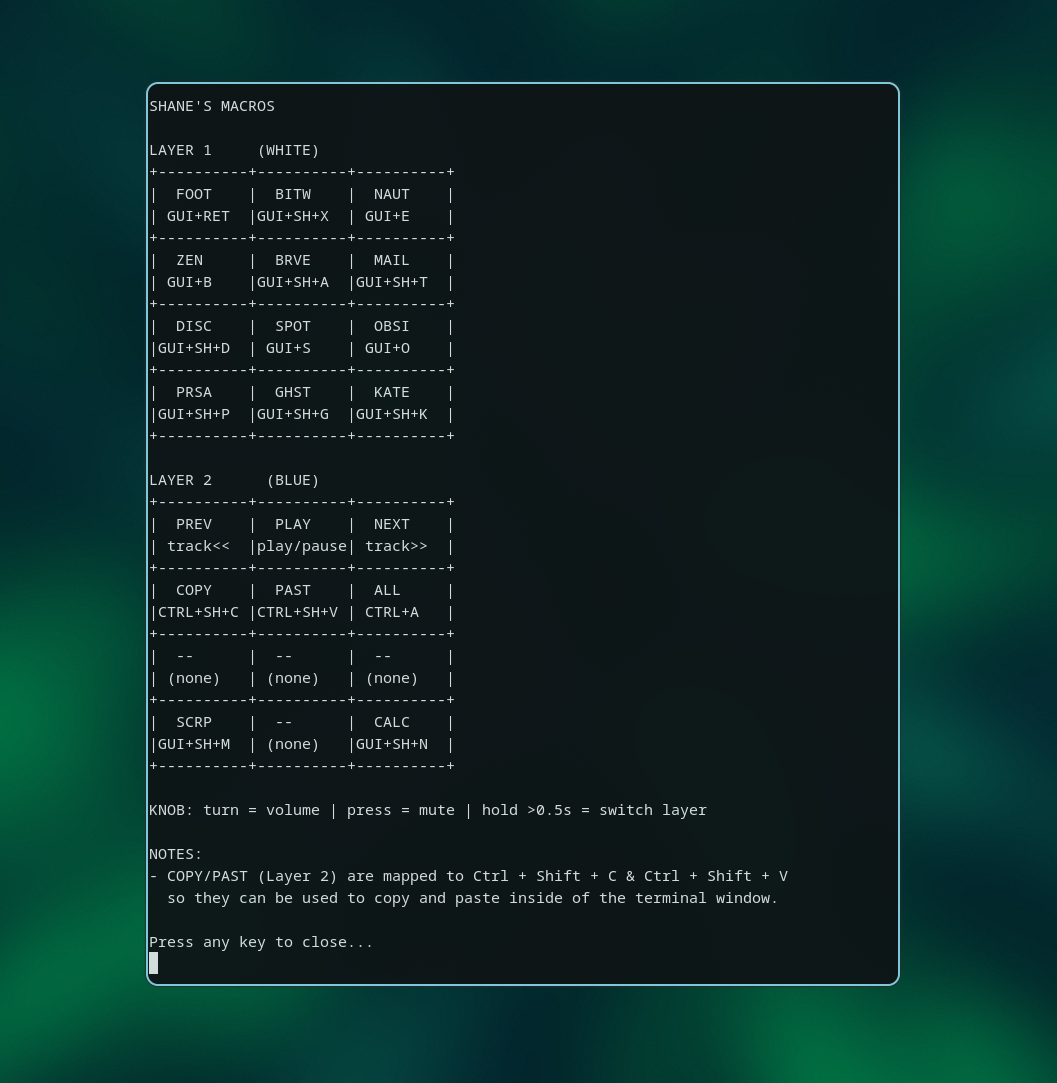
Doing this is incredibly useful and far more convenient than having a file you have to open manually every time you want to view it. I will still have to open the file to make edits, but that isn’t too hard to do.
This setup makes me want to use scratchpads a lot more for stuff like this.
I have an idea in mind that I am working on as I write this. I’m currently installing Fedora Server in a VM to install Docker on. I plan to host ntfy.sh in a Docker container, and once I get this set up, I want the notifications for this to come through in a TUI similar to the macropad layout.
I often have thoughts and things that come to mind when I’m away from my computer, and I would love to send a note from my phone to my computer. There is email and applications like Telegram and Signal, but I feel like there are better options.
I want to use this notification system to be able to push notifications to my computer that show up in a terminal window, and then do the same thing: make a separate scratchpad and set up a keybinding to this one as well, so I can see my notes as I need to.
This is just the start of using scratchpads for me. I find the one I have now to be incredibly handy, and I plan to use as many of these as I can if I have a good reason to.
I look forward to this ntfy.sh scratchpad to help solve this phone-to-computer note problem I’m having.
Thank you for reading.
Until next time,
-Shane